I spent the weekend learning about React.js. There’s been a lot of buzz about frameworks recently built on top of Javascript. I’ve done a lot of javascript development over the years, but it’s almost always been on my own, and preceded the likes of yarn, npm, Typescript, and other package managers & tools that make life in Javascript easier.
I’ve decided finally to get up to speed on current stacks and development processes like using npm to build and deploy applications, and this tutorial was my first adventure into the forest.
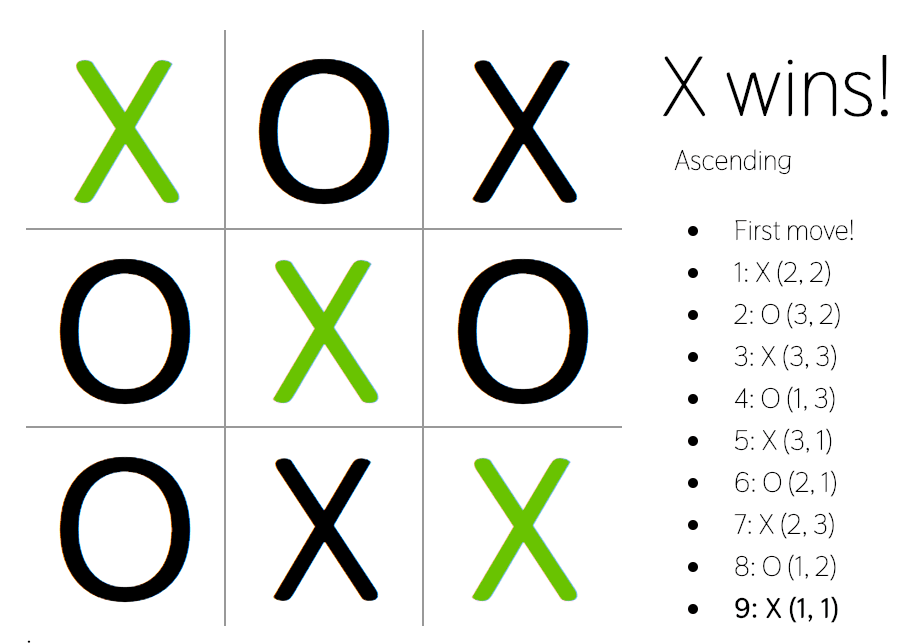
I actually spent a lot of time working on this game, despite how simple it may appear. Despite that, the entire logic, including the ‘time travel’ stepping through the game consists of no more than 250 lines of javascript. See my github repo here.
Below is a (not terribly) detailed journaling of my thoughts as I went through the tutorial.
January 5, 2019
Today I’ve decided to start learning react. I googled “build a react app tutorial”, and found https://reactjs.org/tutorial/tutorial.html.
A few paragraphs in, they recommend reading “this guide” as a re-introduction to Javascript as they are using recent addtions to ECMAScript 6…I don’t want to miss anything from the start, so I follow suit to Mozilla’s re-introduction to javascript.
It provides a background of Javascript and overview (it can run on more than just browsers, fancy that). I think I understand most of the concepts like functions being objects and what that means for classes. Closures are new to me, but I feel like I grasp those pretty well too. I’ve not used promises before.
January 6, 2019
10:57 AM –
I finished reading the Javascript overview. I thought it was really well written. Understandable, detailed and explains the fundamentals of the language–explaining how functions are a type of Objects, how closures work and the concept of prototypes. I found prototypes and the concept of “classes” through objects was the most interesting.
Electrocuted my hands and watched some of the second season of West World with my roommates, back at the React tutorial (and by back at, I mean the start) now.
11:31 AM –
After about 20 minutes of scrolling through and setting up via installing Node.js, and the babble syntax highlighter, I’m ready to get going.
I’ve got the code all downloaded and hosted via npm-start, and am making it through the tic tac toe tutorial.
Surprisingly no feeling of spinning my wheels, unknown issues, or lack of understanding. JSX makes sense to me, though “passing” parameters is one aspect I find too opaque and not transparent to the component.
I’m starting on state now.
2:44 PM –
Ran into my first weird behavior I have stumbled on since starting the tutorial. In the controlled components where I’ve moved up the squares array into the state of the board, each click would move the X rather than add a new one, which is not what I expected.
2:58 PM –
After some lolligagging and debugging, I realized that in the click handler of the square, I used “squares.splice” rather than “squares.slice” so the array was being wiped out erroneously.
5:43 PM –
I’ve been working on the React tutorial pretty solidly all day today. I’m just about wrapped up. Pretty interesting stuff. It’s been very easy to recreate and step through the game using the history of the moves. I love the immutable concept and being able to step through like that.
It feels like a way less buggy way to program, and I cannot believe how few lines of code it took.
Wrap-up
I’m amazed at how simplistic the structure of react really is. I don’t feel I have the most solid grasp on it quite yet, evidenced by struggling to complete even some of the more basic challenges (generate the blocks via looping for instance) the authors posed at the end of the tutorial:
- Display the location for each move in the format (col, row) in the move history list.
- Bold the currently selected item in the move list.
- Rewrite Board to use two loops to make the squares instead of hardcoding them.
- Add a toggle button that lets you sort the moves in either ascending or descending order.
- When someone wins, highlight the three squares that caused the win.
- When no one wins, display a message about the result being a draw.
…I did eventually do all of these and a few more (it’s a labor of love after all), but I don’t fully understand when to use arrows vs. the this object, which seemed to be a pretty important concept.